How to Budget by Paycheck
Budgeting by paycheck means your budget month starts when your pay arrives, not on the 1st. If you’re paid once a month, your month runs from one payday to the next. If you’re paid every two weeks, each paycheck gets its own plan. In Rosemoni you set this once: pick the day your month starts, or switch on “Paid every two weeks”.
Why the 1st is the wrong place to start
If your salary lands on the 20th, a calendar month splits your money in two. The bills you pay right after payday sit in one month and the salary that pays them in the other. Every month looks like it starts in the red and ends with money nobody can find. Start the month on payday and the salary and everything it pays for fall in the same month.
Paid once a month: start your month on payday
In Rosemoni, open Settings and tap your name at the top. Under “Month starts on”, pick the day your salary arrives and save with the checkmark. Quick Setup asks the same question when you start.
From then on, your month runs from payday to payday:
- Your budgets run from payday to payday. A new budget uses your pay month unless you pick another period.
- The Flows screen, where your income is split into spending, saving and investing, runs from payday to payday too. Each month is named for the calendar month most of it falls in: with the 20th, March is 20 February to 19 March.
- Upcoming payments counts what you still pay before your next payday, so you see what your salary has to cover.
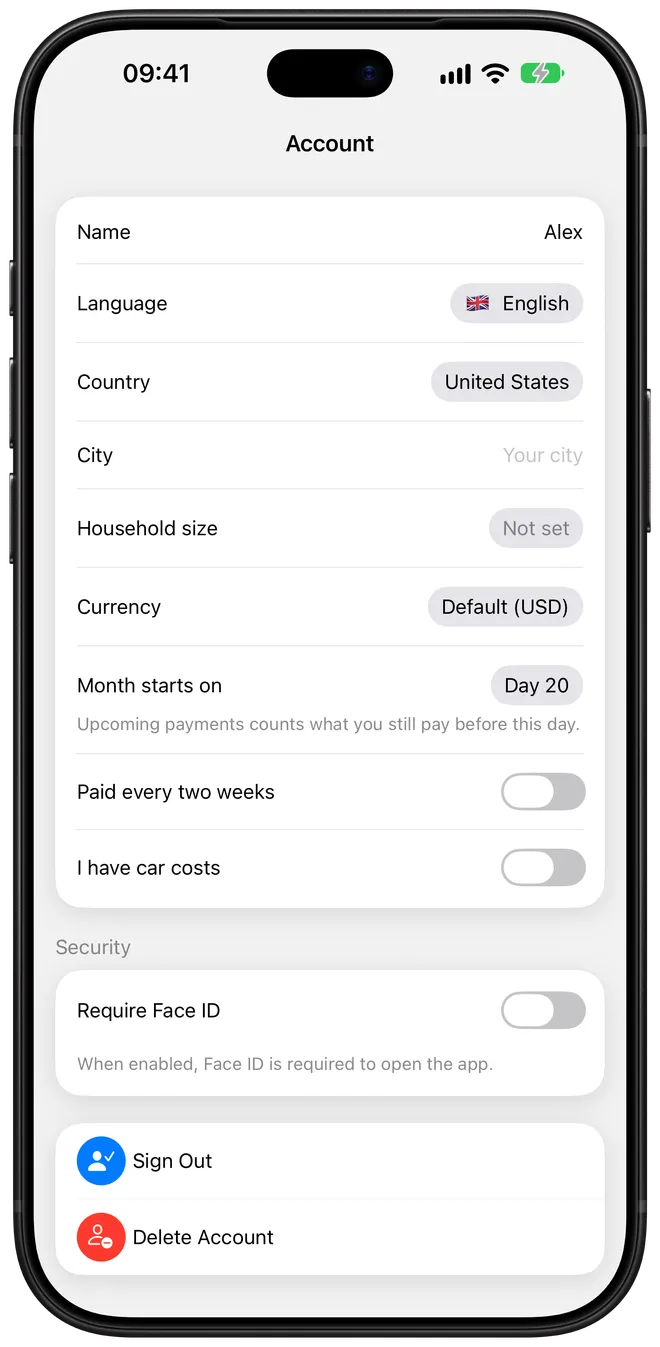
Paid every two weeks: a plan for each paycheck
Open the same screen and switch on “Paid every two weeks”, then set your last payday. Rosemoni works out every payday after it.
- Your payday budgets run in 14-day cycles, each with its own limit per paycheck.
- Upcoming payments counts what is due before your next payday.
- The Flows screen stays on calendar months, because the split of your income there is a monthly plan.
Not every budget has to follow payday
Each budget has its own period: Payday, Monthly, Quarterly or Yearly. The limit is for one period, so you can budget the way the bill comes:
- Groceries and eating out on your payday, so they reset when you’re paid.
- A gym membership or a phone plan on the calendar month.
- Car insurance or a yearly subscription on a yearly budget, so one big payment doesn’t wreck a single month.
On the Budget tab, each card shows the dates of its own period and the days it has left.
A simple way to plan one paycheck
- Bills first. Look at what is due before your next payday. Upcoming payments lists it, or ask Rosa, the assistant in Rosemoni, what you still have to pay before payday.
- Savings next. Set aside what you want to save before you spend, not from what is left at the end.
- The rest goes to budgets. Split what remains over the things you spend on every period, like groceries, transport and eating out.
Through the period, tell Rosa what you spend, in a few words or with a photo of the receipt or a screenshot of your bank app, and she turns it into transactions for you to check and save, so your budgets always show where you stand. When the next paycheck arrives, your payday budgets start again.
More on recording your spending without a bank connection: How to track your spending without linking your bank account.
Questions
What if my payday is the 31st?
Pick Day 31. In a month with fewer days, your month starts on its last day.
Can I go back to calendar months?
Yes. Set "Month starts on" to Day 1, which is the calendar month, or switch off "Paid every two weeks".
Does every budget have to follow my payday?
No. Each budget has its own period. Keep groceries on your payday and put a yearly bill on a yearly budget.
Do I need to link my bank account?
No. Nothing in Rosemoni is linked to a real bank. You tell Rosa, the assistant in the app, what you spent, or share a receipt or a screenshot of your bank app with her, and she turns it into transactions for you to check and save.
More guides
- The Best Budgeting Apps in Canada (2026)
The best budgeting apps in Canada in 2026 compared side by side: bank connection, receipts, subscriptions, payday budgets, assistants, family sharing and price.
- The Best Budgeting Apps in the UK (2026)
The best budgeting apps in the UK in 2026 compared side by side: bank connection, receipts, subscriptions, payday budgets, assistants, family sharing and price.
- The Best Budgeting Apps in the US (2026)
The best budgeting apps in the US in 2026 compared side by side: bank connection, receipts, subscriptions, payday budgets, assistants, family sharing and price.